Fill in the first-run basics
Who this is for. Shop owner.
Watch it
21 seconds, narrated, captions on. Sample shop. Made-up names and tickets.
What the clip says
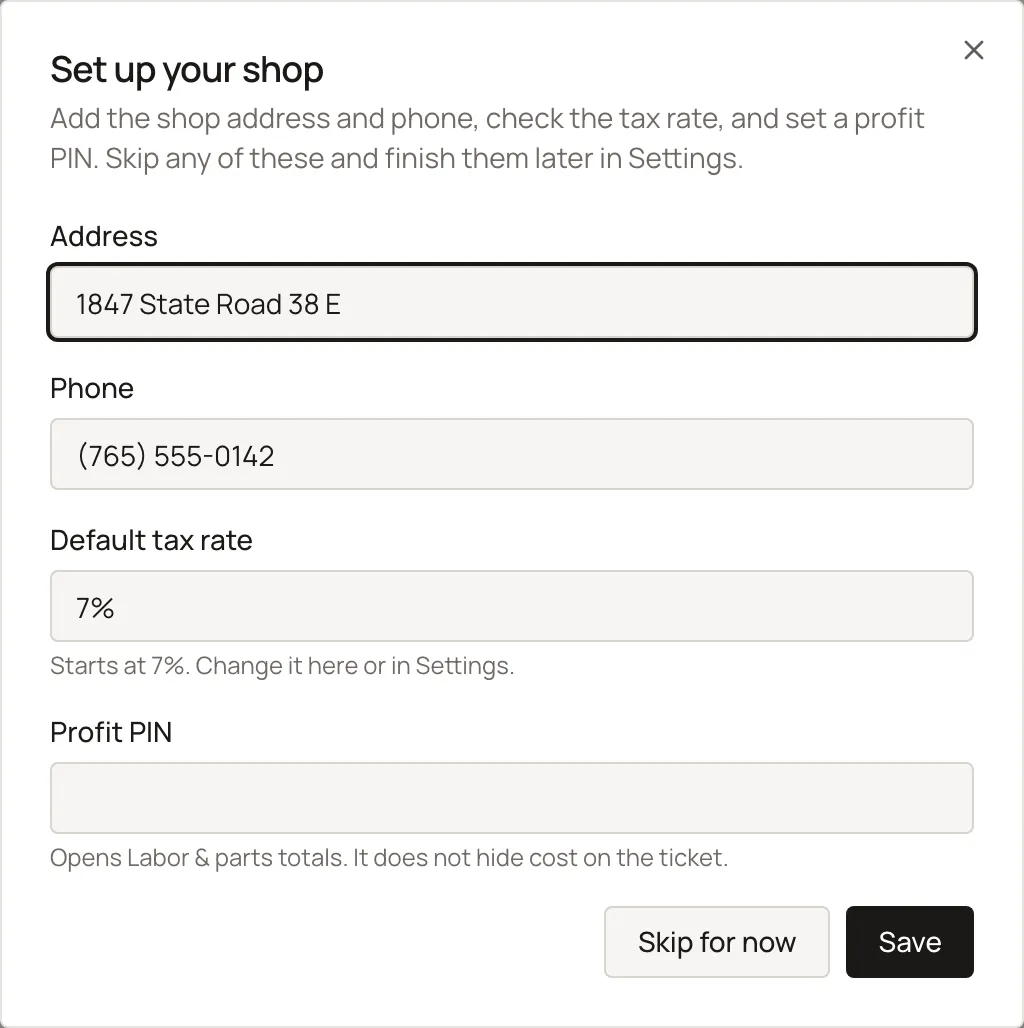
The first time a new shop lands on Customers, this prompt opens once. Add the shop's address and phone. Check the tax rate, and set a shop code here. Save now, or skip and finish this later from Settings.
A first-run prompt on Customers offers to fill in the shop’s basics without leaving the page. Skipping it does not block a first ticket, but nothing else prompts you toward Settings after this.
Steps
- Fill the shop fields inline, or click Skip.
Sample shop. Made-up names and tickets.
Before your first ticket
Before your first ticket
The trial runs 14 days with no card, then $40 a month per shop until you cancel from Settings, Billing. None of the six items below block a first ticket, so check them yourself before you invoice one.
- Shop address. Prints on every ticket and invoice. Set in Shop profile.
- Default tax rate. A brand-new shop starts at a generic 7 percent, not your state’s rate. Set in Default tax rate.
- Timezone. Set in Shop profile, alongside the address.
- Shop code. Settings calls this the Profit PIN. Set in Shop profile.
- The three starter labor codes. A new shop already has a small starter set. Check them in Labor codes.
- Payment types. Choose which tenders the counter can take. Set in Card setup.
What happens to money and stock
Nothing moves.
Watch out for
- Only shows once per browser, per shop.
- The trial banner is the only nudge toward Settings before your first ticket: check the shop's address, tax rate, timezone, and shop code there before you invoice anything.
Updated September 16, 2026