Small engine repair shop software
Work orders that remember every machine.
Pull up the customer, open the mower or saw by serial, add parts and labor, then print the invoice, save it as a PDF, or email it to the customer. Every ticket stays with the machine, even when it changes hands.
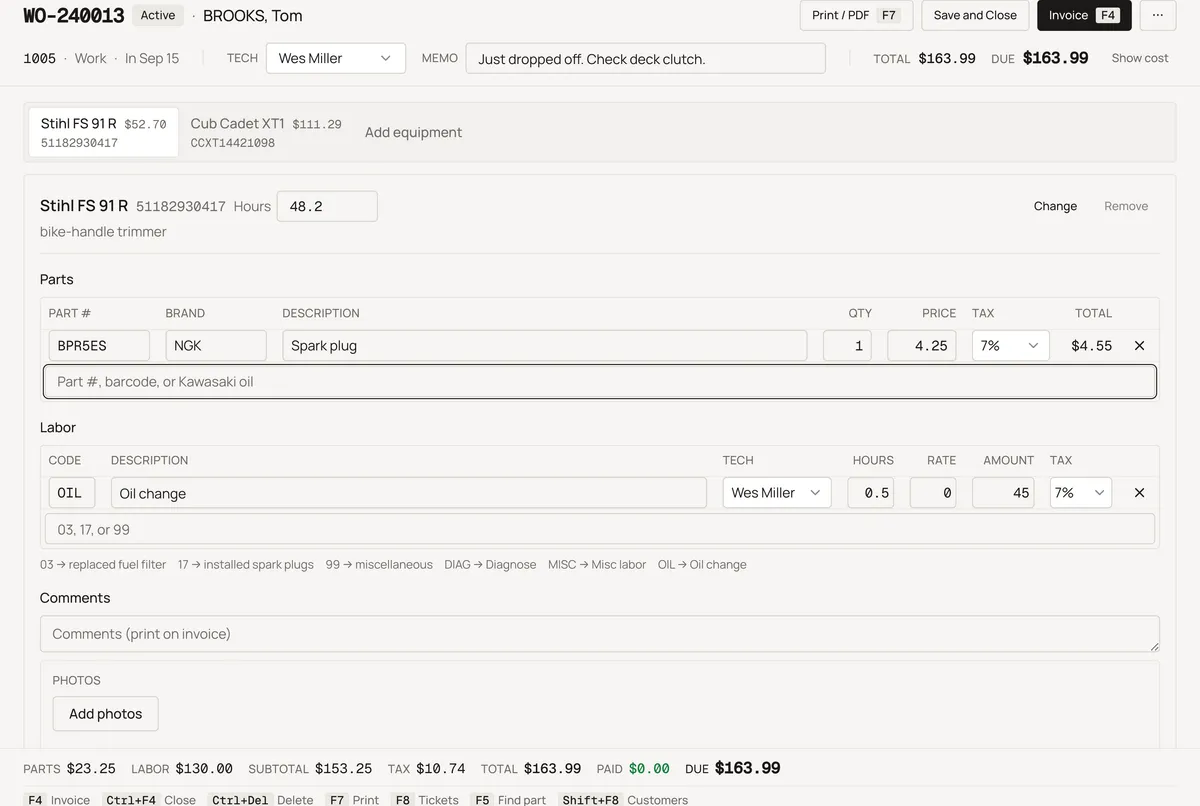
Know the customer. Know the machine. Finish the ticket.
One screen at a time, in the order the work happens. Nothing to configure before the first ticket.
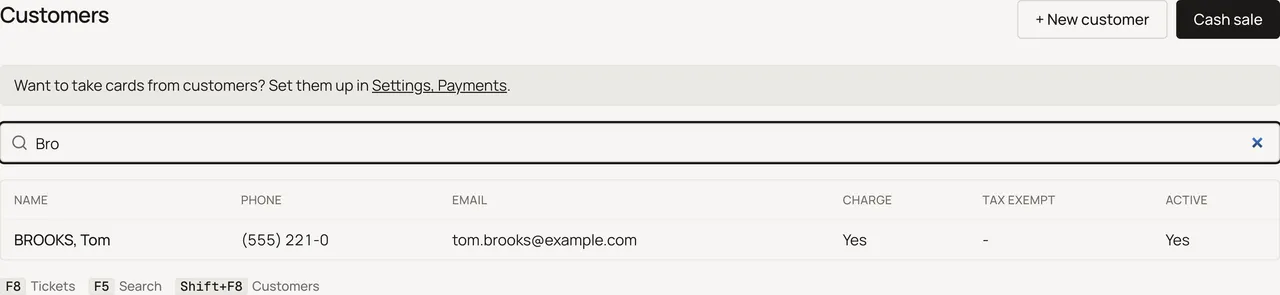
Type a name, a phone number, or an email. Their page opens: open tickets, their machines, and what they owe.
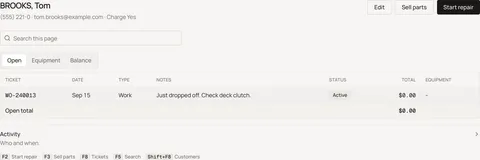
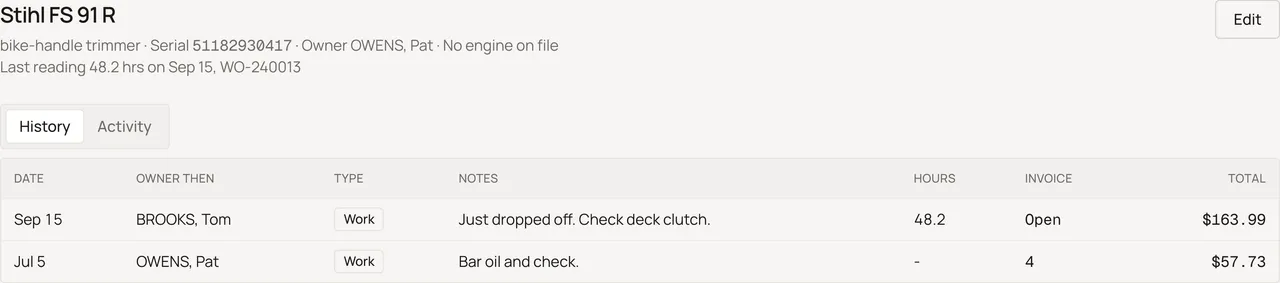
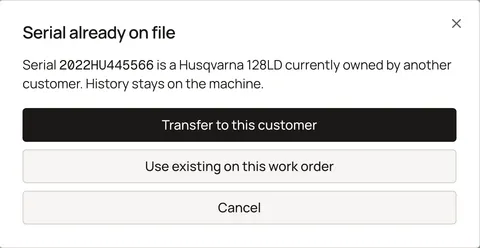
Pick one of theirs or type the serial. Every ticket ever written on that serial is right there, including the ones from before they owned it.
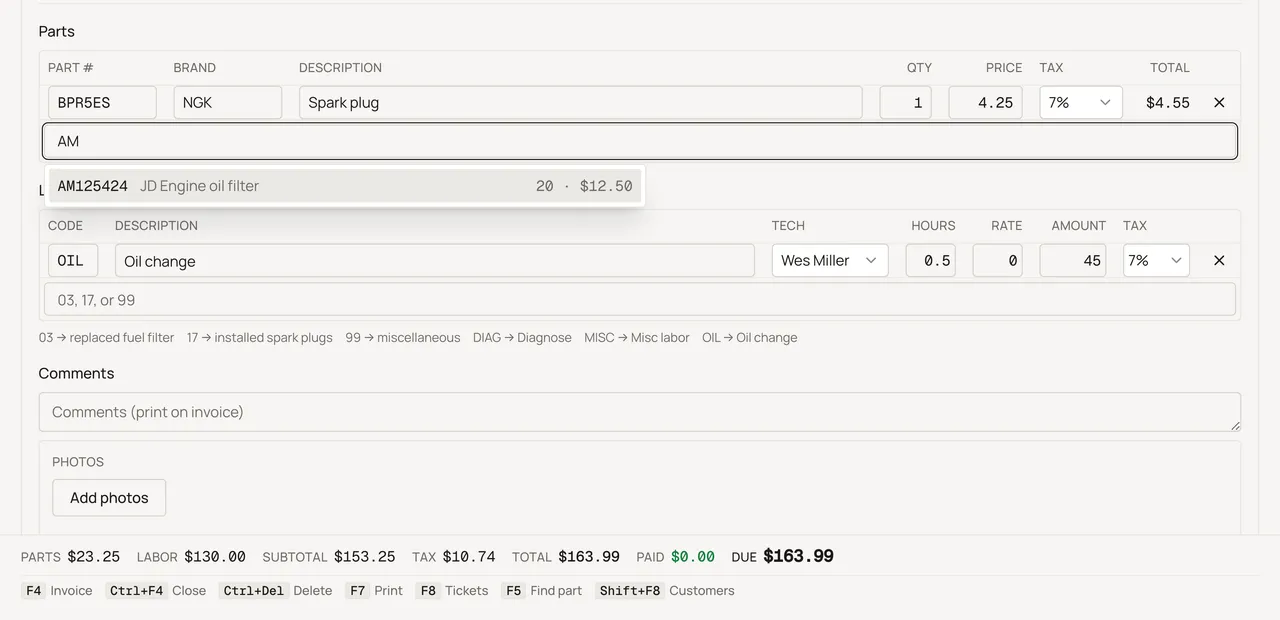
Type or scan part numbers and labor codes, add the hour-meter reading and a photo of the machine. Cost and profit open with your shop PIN, and never print on the customer's copy.
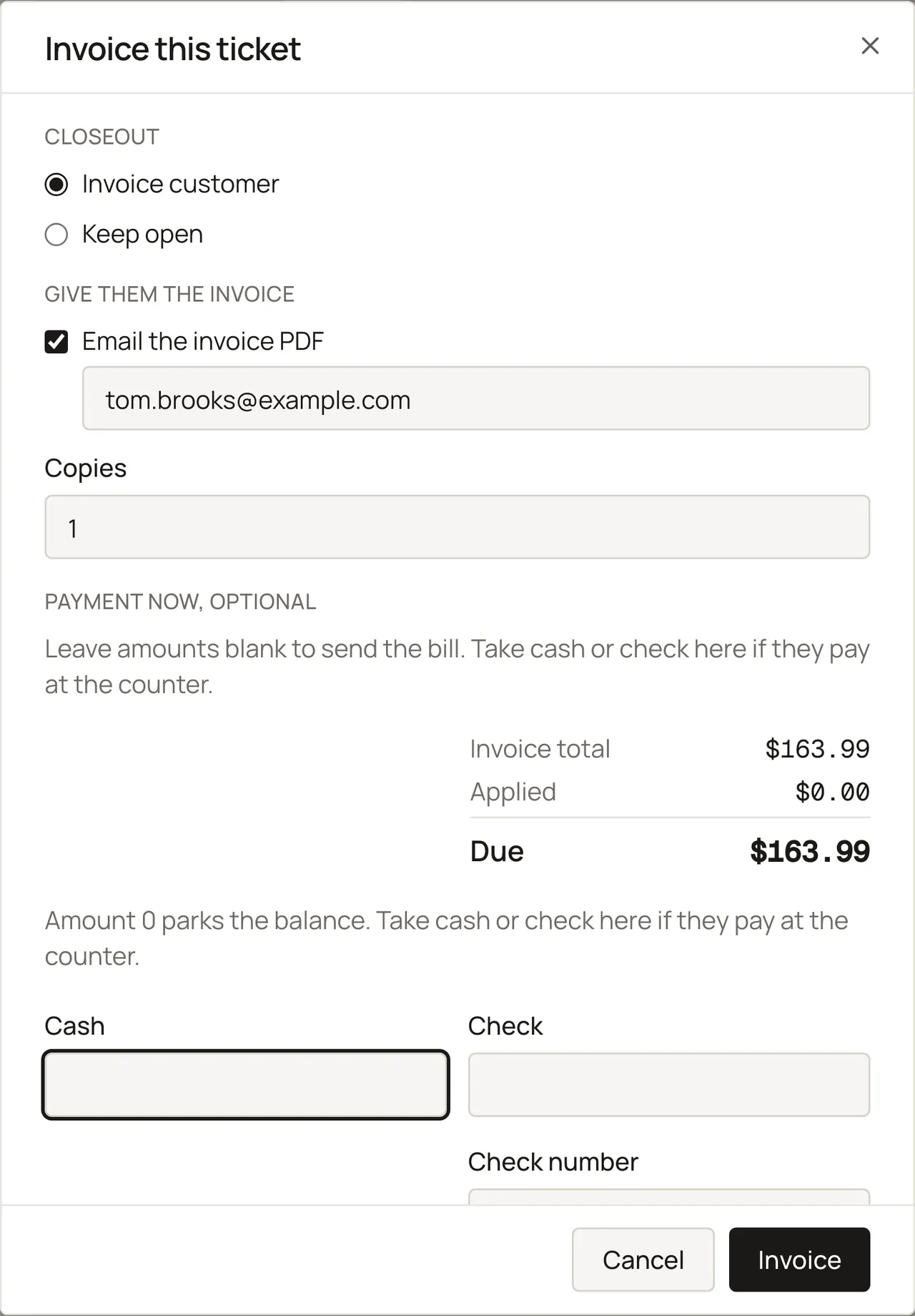
Invoice now, or leave it open until the parts come in, then record cash, check, or card, or put it on their account. Print the invoice or email the PDF.
What it replaces
Most shops come to ReedPort from one of three places.
- →The work-order pad, the card file, and the notebook of who owes you
Customers, machines, and every ticket, searchable by name, phone, or serial. Receivables with aging. - →A dealer system you use a tenth of
The counter day only. No accounts payable, general ledger, payroll, or factory price files. $40 a month, not a quote. - →An auto-shop app built around the phone
Tickets, invoices, and inventory. No phone bot, no review texts, no card terminal to lease.
What's on the counter
Sample shop. Made-up names and tickets.
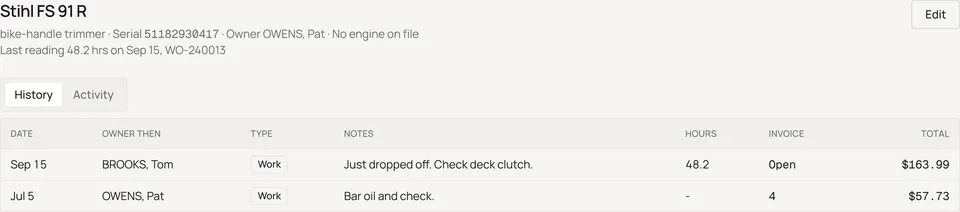
Every machine keeps its own history
The history follows the serial number, not the owner, so a resold machine's tickets keep stacking under whoever has it now.
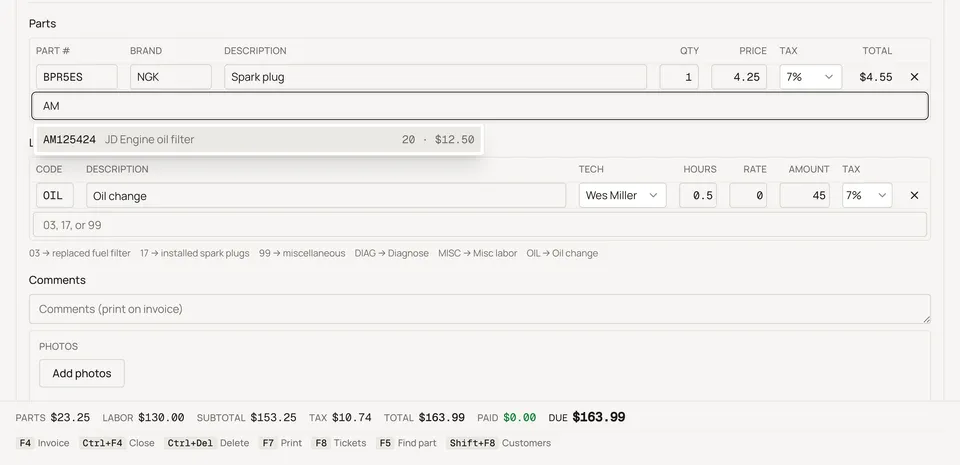
Keyboard first. The scanner is a keyboard.
F4 finishes, F8 opens Tickets, and a USB barcode scanner just types into whatever field you've clicked.
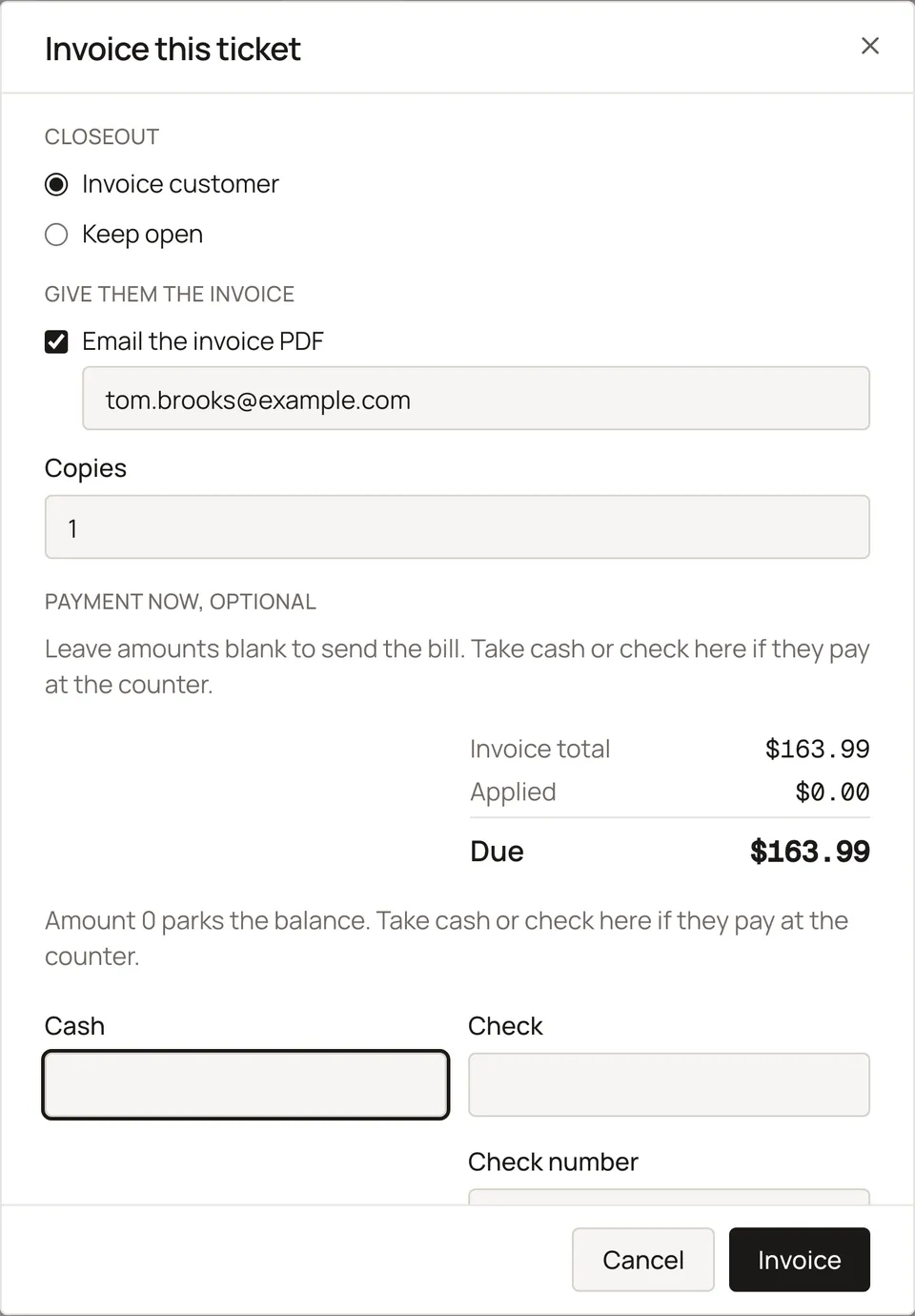
Invoice now, or leave it open
Leave a ticket open while parts come in, then print one copy or three, save it as a PDF, or email the invoice.
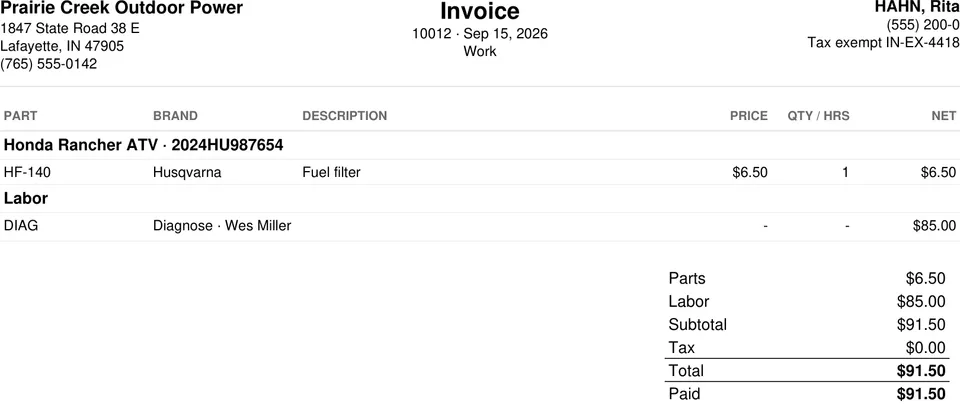
Print that fits a long rebuild
One tight block for shop, customer, and ticket number, then parts and labor. The customer's copy never shows your cost or profit.

Charge accounts and farm exemptions
Landscapers and farms can pay monthly on an account with aging, and tax-exempt customers carry their exemption number and expiry.
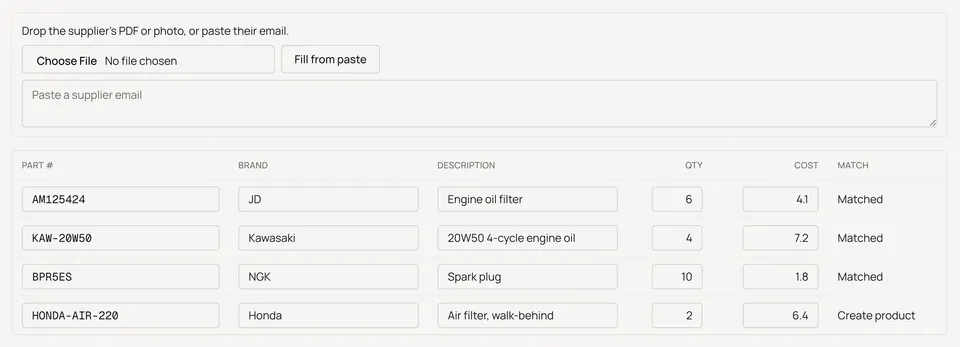
Parts in when they arrive. Parts out when they sell.
Type it, scan it, drop the supplier's PDF or photo, or paste their email. Review the lines, then Receive. Nothing posts to on-hand until you confirm.
You see what the shop made. Your employees don't.
Cost and profit on the ticket, and the shop-wide totals, open with your shop PIN, once a session. Nothing about cost or profit ever prints on the customer's copy.
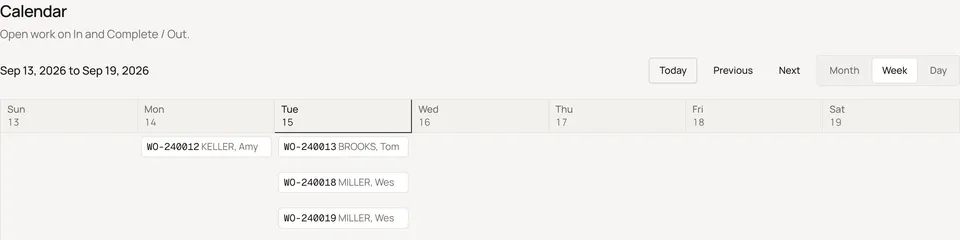
A calendar of the shop's load
Open tickets show on the days they're in the shop, from In to Out. Switch Month, Week, or Day, and click a ticket to open it.
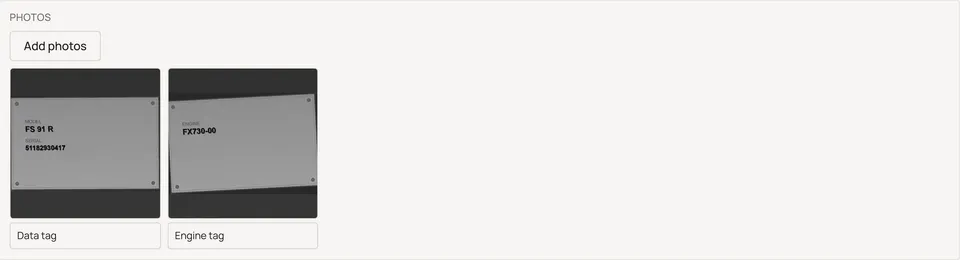
A photo says it in one look
Take a photo of the machine and caption it. Photos stay on the ticket, never the customer's invoice, and print on shop copies only when you turn that on in Settings.

One tab per machine on the ticket
A ticket with more than one machine gets a tab for each, hours on the header, and the purchase date and invoice for machines sold here.
$40 a month per shop. That's the whole price list.
Try it for 14 days first. No card until you decide.
- -Every feature on this page. One plan.
- -Every employee included. No per-user fees.
- -No setup fee. No contract. Month to month.
- -Cancel from Settings → Billing. The shop runs to the end of the month you paid for.
- -Your records are yours. Ask and we send them to you as a file.
- -A second location is a second shop, $40 each.
US dollars, plus applicable sales tax. It renews each month at $40 per shop until you cancel from Settings → Billing. See the refund and cancellation policy.
Card payments are optional. Turn them on and take a card through Stripe, at Stripe's published rates. ReedPort adds no fee of its own.
Not for you if
We'd rather tell you now than after you've typed in 300 customers.
- -You need accounts payable, a general ledger, or payroll in the same program. ReedPort is the counter. Keep your bookkeeping program and your accountant.
- -You need factory price files, an OEM parts catalog, warranty claim filing, or an import from your dealer system. Stay on the dealer system.
- -You want texting, review requests, online booking, an AI phone answerer, or photo inspections sent to the customer's phone. That's an auto-shop app.
- -You have two locations that share one parts inventory. Not yet.
- -You need QuickBooks sync today. Not yet.
See it before you type anything in
Every screenshot on this page is the product, running a sample shop with made-up names. None of it is a mockup. Walk the sample shop yourself. Reload to reset.
North Trestle LLC, a small Tennessee company in Knoxville. ReedPort started with a shop owner's drawer of work orders and a dealer-system quote he wasn't paying. Email support@reedport.com and a person answers, not a queue.
ReedPort was built alongside a working small engine shop, and every screen was walked at a real counter before it shipped.
It stays yours. We don't sell customer lists, and we'll send you a file of your records any time you ask. Your data lives in a hosted database in the United States (AWS US East 1 (Northern Virginia)), where every row is scoped to your shop, with point-in-time restore covering the last 6 hours. See Security for the rest.
Questions
What is ReedPort?
Shop software for small engine and outdoor power repair shops: mowers, zero-turns, saws, trimmers, blowers, generators. You look up a customer, open their machine by serial, write parts and labor, and finish with an invoice. It keeps every ticket on the machine's serial number, tracks parts in and out, handles charge accounts, and shows you what the shop made. It runs in a web browser. $40 a month per shop.
What does it replace?
The work-order pad, the customer card file, the invoice you type up, the notebook of who owes you, and the guesswork about what you did to that mower last spring. If you're on a dealer management system and use a tenth of it, ReedPort is the tenth. If you're on paper, it's the same steps you do now, with the history kept.
How long does it take to set up?
Creating the shop takes a few minutes: your name, email, a password, and the shop name. Confirm your email by the link or the 6-digit code and your trial starts on the Customers page. Add your tax rate, labor codes, and PIN in Settings when you have ten minutes. Then write today's tickets. Customers and parts get added as they come through the door; you don't have to enter everything first.
Can I bring in my customer list?
Yes. Choose Bring a list on Customers, Equipment, or Inventory. Paste from Excel, or drop a CSV or photo of a printout. Review the table, then Bring in. People, machines, and parts come across. Tickets, invoices, and leftover balances stay out. You can also start with the day's tickets and let the file build.
Does it work with a barcode scanner?
Yes. Plug a USB barcode scanner into the PC. Click the part field, scan, and the number lands in the field as if you typed it. It works on tickets, on Receive, in inventory search, and on the Equipment list for serials. There's no scanner app to install.
What does it run on? Do I need a new computer?
It runs in a web browser (Chrome, Edge, Safari, Firefox) on the Windows PC or Mac you already have. Nothing to install and nothing to back up on your end. It's built for a PC with a keyboard.
Does it have a dark mode?
Yes. Pick system, light, or dark from Appearance in the sidebar on each device; reedport.com follows your system setting too.
Can my employees use it? Who can see what?
Yes, at no extra cost. You create the shop and invite them from Settings; each gets their own sign-in. Employees can do everything at the counter: customers, machines, tickets, receiving, payments. Only you can invite people, void an invoice, change settings, or see Billing. Show cost, on the ticket and for shop-wide totals, opens only with your PIN.
Does it print? Can I fax an invoice?
Every ticket and invoice prints, saves as a PDF, or emails as a PDF straight from the ticket. Open tickets print a shop copy as a PDF too. The letterhead is one tight block so a long rebuild list fits on the page. Fax it the way you fax anything else: print it, or send the saved PDF through your fax machine or fax service.
Can I put photos on a work order?
Yes. Take a photo of the machine right from the ticket and caption it, up to 25 per machine. Photos stay on the shop side, never on the customer's invoice, and print on shop copies only if you turn that on in Settings.
Does it track hours on the machine?
Yes. Type the hour-meter reading on the ticket or when you add the machine, and the machine's page shows the last reading and which ticket it came from.
Does it take card payments, send texts, or do my books?
Cards, yes. Texts and books, no. Turn on card payments in Settings and take a card through Stripe: a payment link, a Stripe reader, or tap to pay on your phone. Stripe charges its own published rates; ReedPort adds no fee on top. It's optional. Cash and check work without it. There are no text messages or review campaigns. It doesn't do payroll, accounts payable, or a general ledger. It gives you the shop's labor and parts totals so you and your accountant have the numbers.
Is this a dealer management system?
No. Dealer systems are built for franchised dealers: purchasing, factory price files, warranty claims, payroll, general ledger, and a quote to install it. ReedPort is the part of that day that happens at the counter. If you need the whole suite, stay on a dealer system.
Does it connect to QuickBooks?
Not yet.
How does the trial work? Do I need a card?
You get 14 days with everything on, and no card. The trial starts when you confirm your email, by the link or the 6-digit code. If you don't confirm within 48 hours, the signup is dropped and you can start over. Near the end you'll see a Billing tab where you pay $40 for the month if you want to keep going. If you don't, the shop closes at the end of day 14 and nothing is charged.
How do I cancel? What happens to my records?
Cancel from Settings → Billing whenever you like. The shop keeps running to the end of the month you paid for, then it closes.
Can I get my data out?
Yes. Your customers, machines, tickets, and invoices are yours. Ask and we send them to you as spreadsheet files, during the trial or after you cancel.
Is my data backed up? Where is it kept?
Your shop's records live in a hosted database in the United States (AWS US East 1 (Northern Virginia)), with point-in-time restore covering the last 6 hours. One database holds every shop and every row is scoped to yours; see the security page for who can see what.
I have two locations.
Each location is its own shop at $40 a month, with its own customers, inventory, and totals. One sign-in works on one shop today.
What if something breaks or I get stuck?
Email support@reedport.com and a person answers, usually the same day. There's no phone tree.
Who makes ReedPort?
North Trestle LLC, a small company in Knoxville, Tennessee. ReedPort was built alongside a working small engine shop, and every screen was walked at a real counter before it shipped.
Try it on your counter for 14 days.
Create the shop in a few minutes. Write today's tickets in it. If it isn't faster than the pad by Friday, walk away. There's no card to cancel.
Start your 14-day trialNo card. Then $40 a month per shop.