Add a second machine to the same ticket
Who this is for. Counter, shop owner.
Watch it
16 seconds, narrated, captions on. Sample shop. Made-up names and tickets.
What the clip says
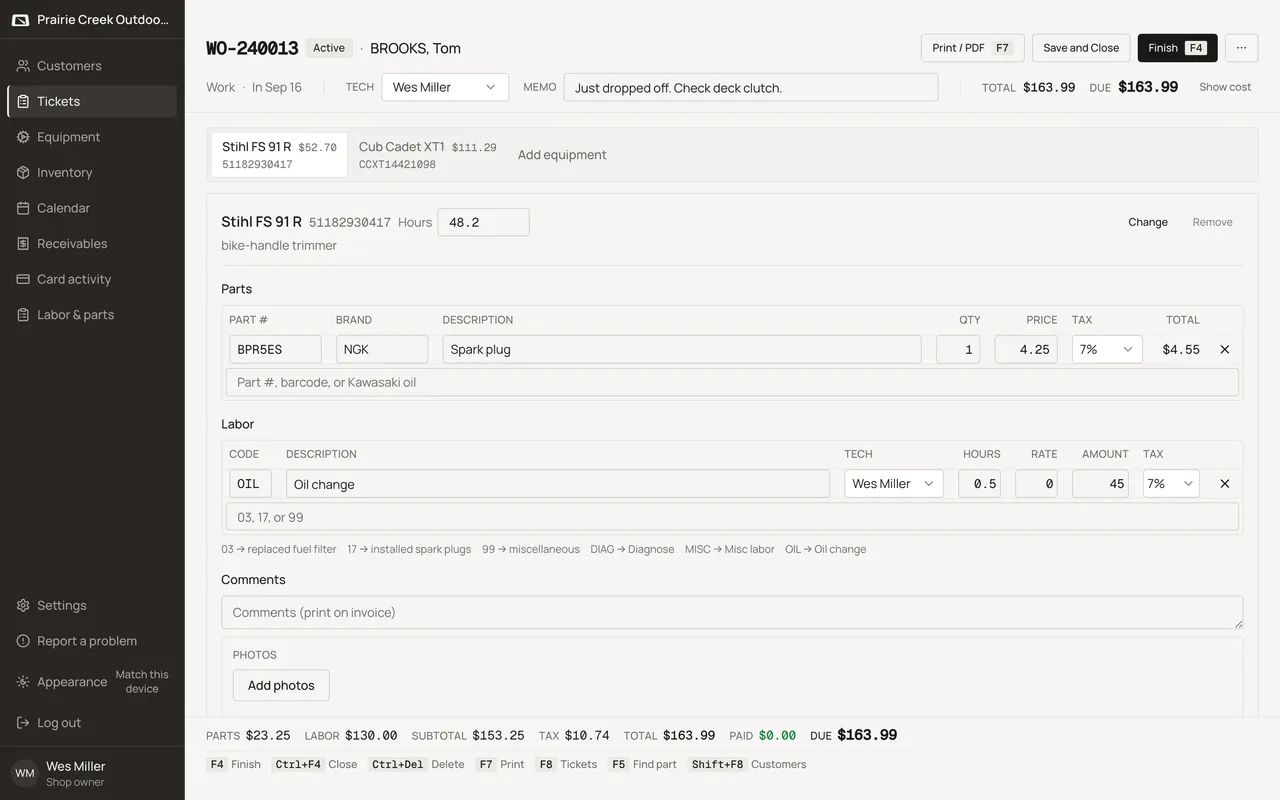
One visit, two machines: each gets its own tab on the same ticket. Parts, labor, and the running total stay separate per machine. Add equipment at the end of the tab strip brings in another one.
Each machine on a work ticket gets its own tab across the top of the ticket body, with its own running total. Add, swap, or remove a machine without leaving the ticket.
Steps
- Add equipment sits at the end of the tab strip. It opens the same equipment lookup, scoped by default to this customer’s own machines.
- Filter by serial, model, or brand, or scan a barcode. Pick a result to attach it, or + New equipment to create one on the spot.
- Inside a machine’s section, Change reopens the lookup to swap that section’s machine for another.
- Remove stays disabled until that machine’s section has zero parts, zero labor, and zero photos.
Watch out for
- Remove is disabled until that machine's section has zero parts, labor, and photos.
- The same serial cannot appear twice on one ticket, or on two open tickets at once.
Updated September 16, 2026