Set tax and tax-exempt lines
Who this is for. Counter, shop owner.
Watch it
15 seconds, narrated, captions on. Sample shop. Made-up names and tickets.
What the clip says
Rita Hahn is on file with a tax exemption. New lines on her tickets already default to Exempt. Any single line's Tax box can still be switched back to the shop rate.
Each parts and labor line has its own tax setting. A customer’s Tax exempt flag only changes what new lines default to; it never rewrites a line that is already on the ticket.
Steps
- Each parts or labor line has its own tax select: the shop’s default rate, Exempt, or whatever rate that line already has. Any single line can be overridden up or down.
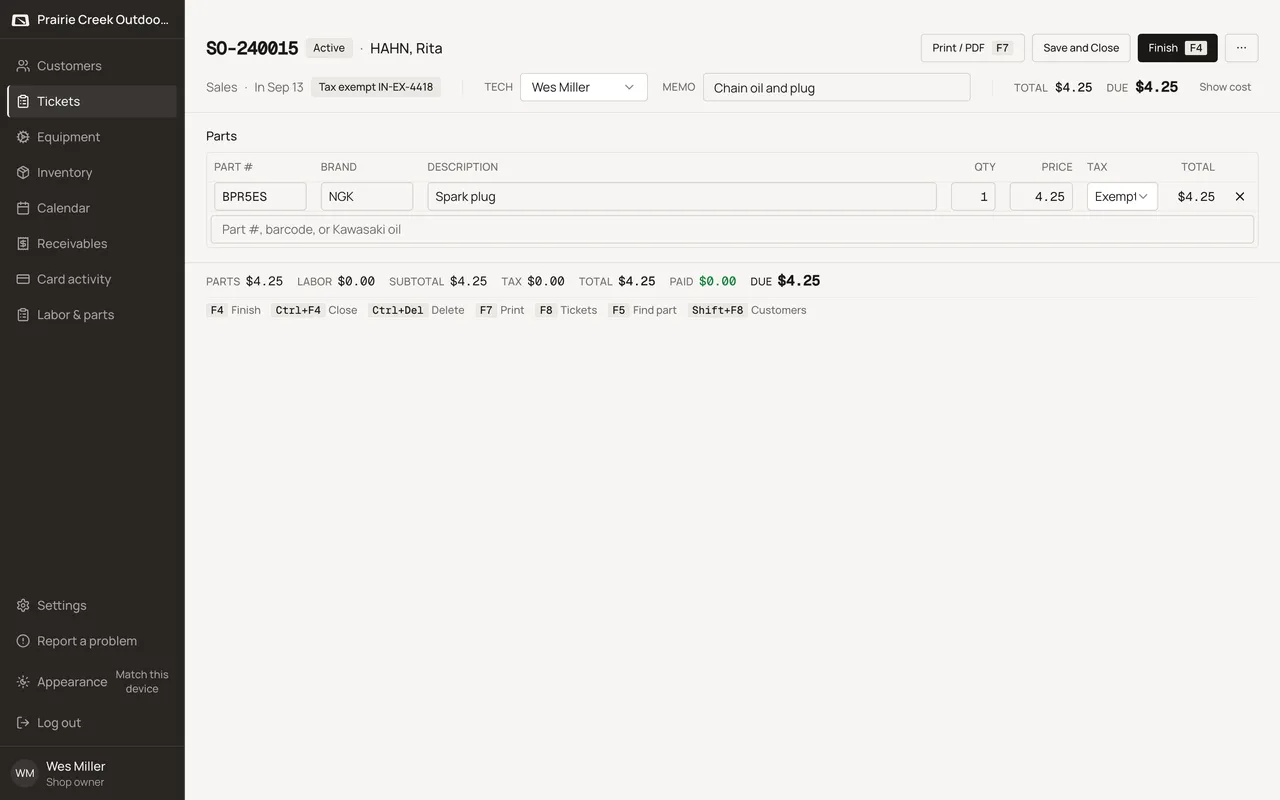
- A customer’s own Tax exempt toggle, plus Exemption # and Expires, drives what new lines default to.
- A valid certificate makes new lines default to Exempt.
- A missing or expired certificate falls back to the shop rate, with a warning badge, “Exempt expired <number>”, shown on the customer page and the ticket header, and a note in the Finish ticket dialog.
Watch out for
- An expired exemption does not touch saved lines. Only new lines fall back to the shop rate.
- Counter Sale can never be tax exempt.
Updated September 16, 2026