Punch labor onto the ticket
Who this is for. Counter, shop owner.
Watch it
15 seconds, narrated, captions on. Sample shop. Made-up names and tickets.
What the clip says
Quick-pick chips list every labor code in the shop. Tapping one adds a line, flat or hours times rate depending on the code. Type the hours and Enter locks in that line.
Sales tickets carry no labor. On a work ticket, each machine section has its own labor grid, with quick-pick chips for the shop’s own codes.
Steps
- Each machine section has its own labor grid with a punch field, placeholder 03, 17, or 99.
- A row of clickable quick-pick chips sits below the field, one per labor code in the shop, so a counter can tap a known code without typing.
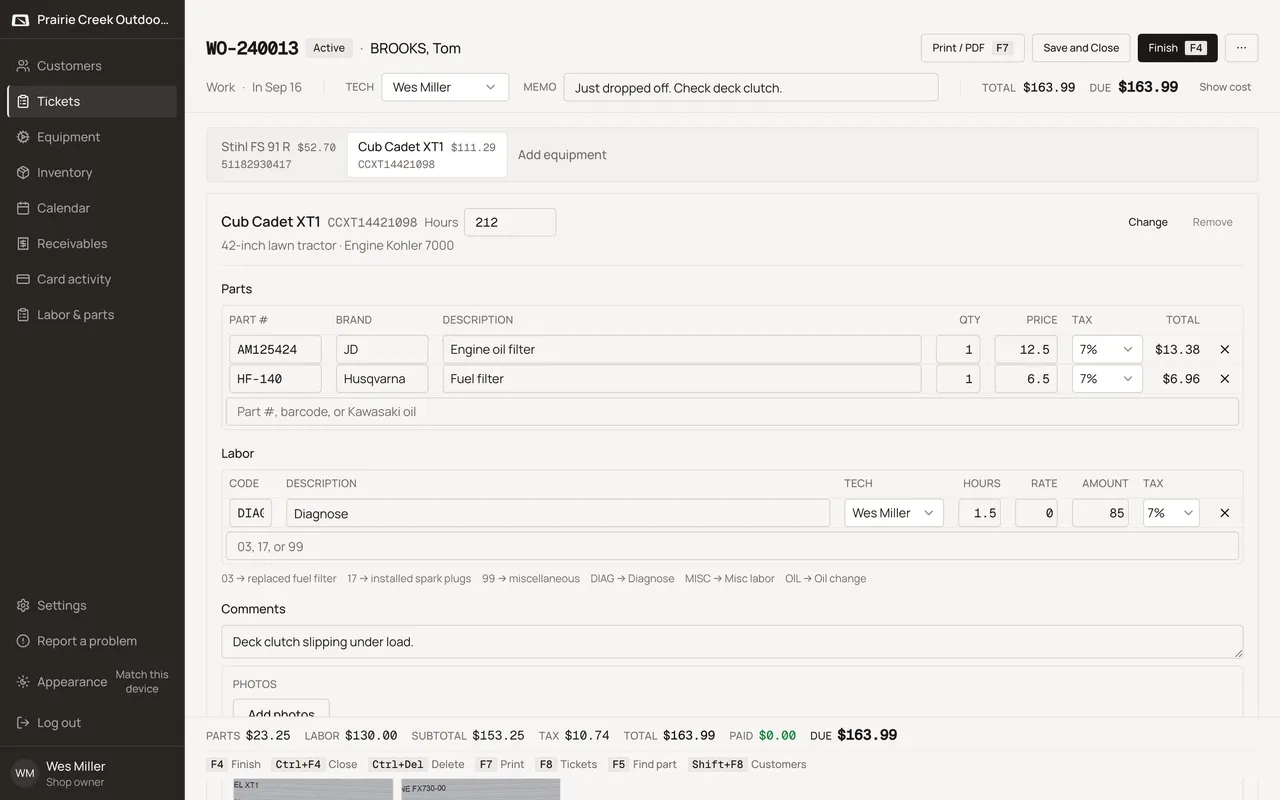
- Punching a known code adds a line: a flat amount, or hours times rate, depending on the code’s mode.
- A hidden MISC code, if the shop has one configured, is offered as Misc labor · “<text>” for anything typed that does not match a code.
- Each machine also has its own Hours input in the section header and a Comments textarea that prints on the invoice.
What happens to money and stock
Labor never touches inventory. It only adds to the ticket total.
Watch out for
- Quick-pick chips let a counter tap a known labor code without typing.
Updated September 16, 2026