Follow a machine's history across owners
Who this is for. Counter, shop owner.
Watch it
16 seconds, narrated, captions on. Sample shop. Made-up names and tickets.
What the clip says
Every machine has its own History tab, no matter who owns it now. Each row shows the owner at the time, not the current owner. A transfer shows up here too, alongside the tickets and invoices.
A machine’s History tab lists every ticket and invoice that ever touched its serial, regardless of who owned it then. The header shows the current owner, engine, and last hours reading.
Steps
- Open a machine from Equipment, a customer’s Equipment tab, or a serial clash dialog.
- History lists every ticket on this serial, each row showing the owner at that time, not the current owner.
- Activity is a separate who/when timeline of edits, not a replacement for History.
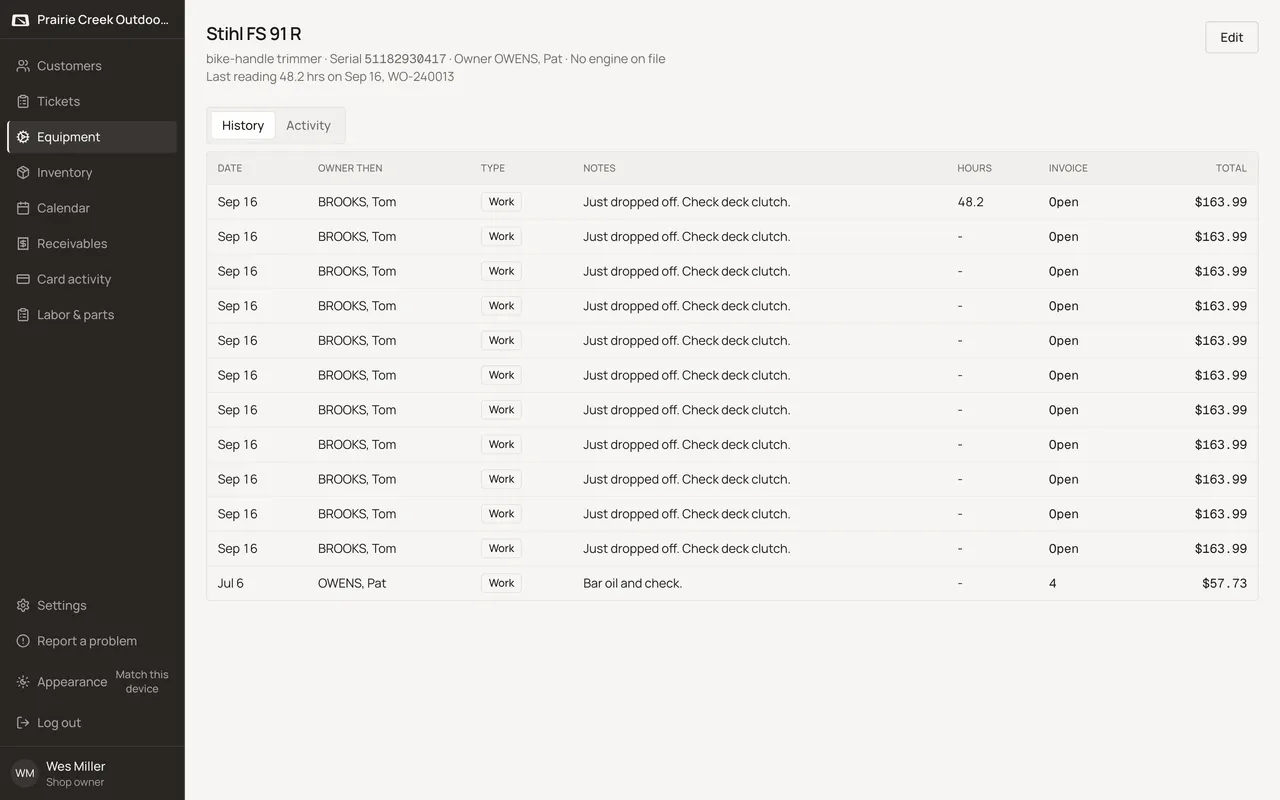
Sample shop. Made-up names and tickets.
What happens to money and stock
Nothing moves.
Watch out for
- History shows the owner at the time of each row, not the machine's current owner.
- The shop-wide Equipment list has no owner column by design.
Updated September 16, 2026