Ring up a cash sale
Who this is for. Counter, shop owner.
Watch it
15 seconds, narrated, captions on. Sample shop. Made-up names and tickets.
What the clip says
Cash sale is one click, straight to a parts-only ticket. It lands on Counter Sale. No customer to pick, no machine needed. Punch a part the same way any ticket does.
Cash sale is the one-click shortcut for a walk-in who needs parts and nothing else. It always lands on the shop’s own Counter Sale customer.
Steps
- Click Cash sale on Customers or Tickets.
- Land directly on a new parts-only ticket on Counter Sale, ready to punch parts.
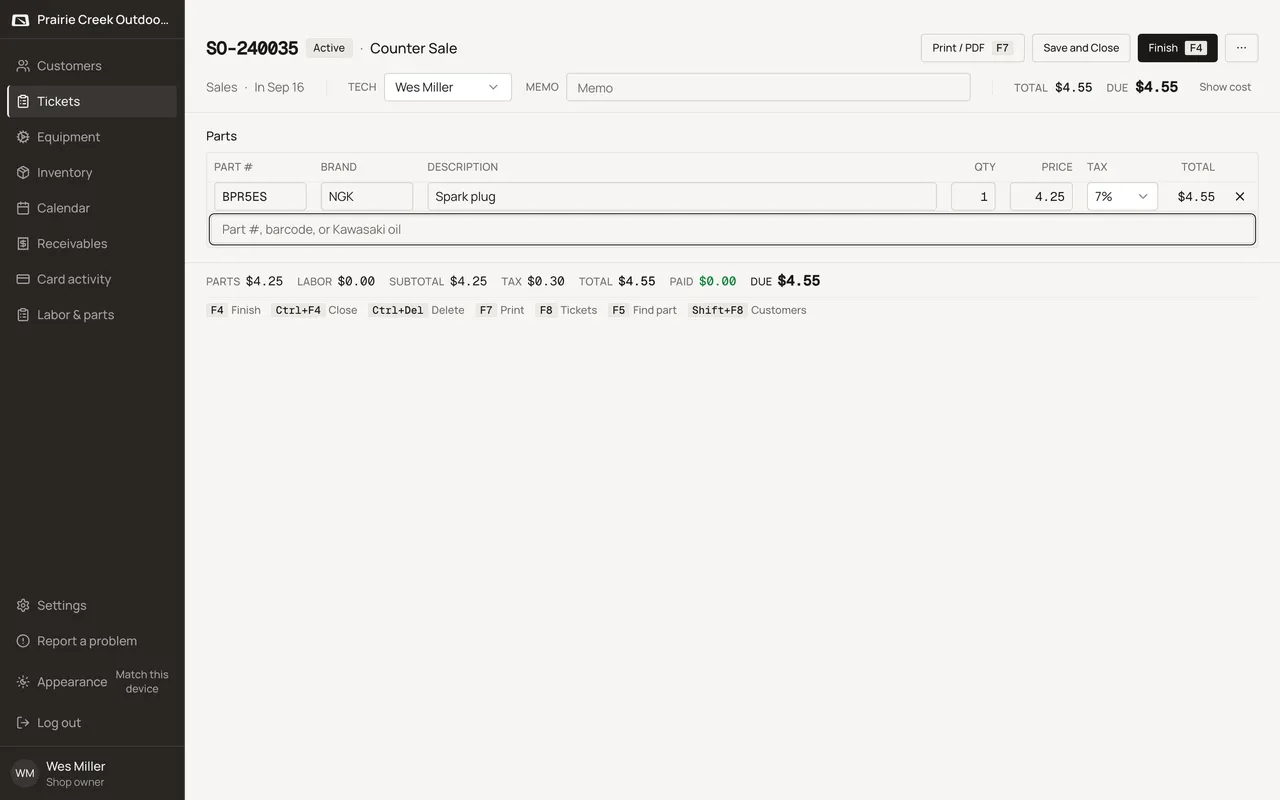
Sample shop. Made-up names and tickets.
What happens to money and stock
Creates a parts-only ticket on the shop's Counter Sale customer; standard parts-line and Finish rules apply once parts are punched.
Watch out for
- Counter Sale can never be Charge or tax exempt.
- A double-click reuses the same ticket instead of creating two.
Not yet
There is no deposit or partial-hold option on a cash sale. Parts are punched and paid, or parked, the same way any ticket is at Finish.
Updated September 16, 2026