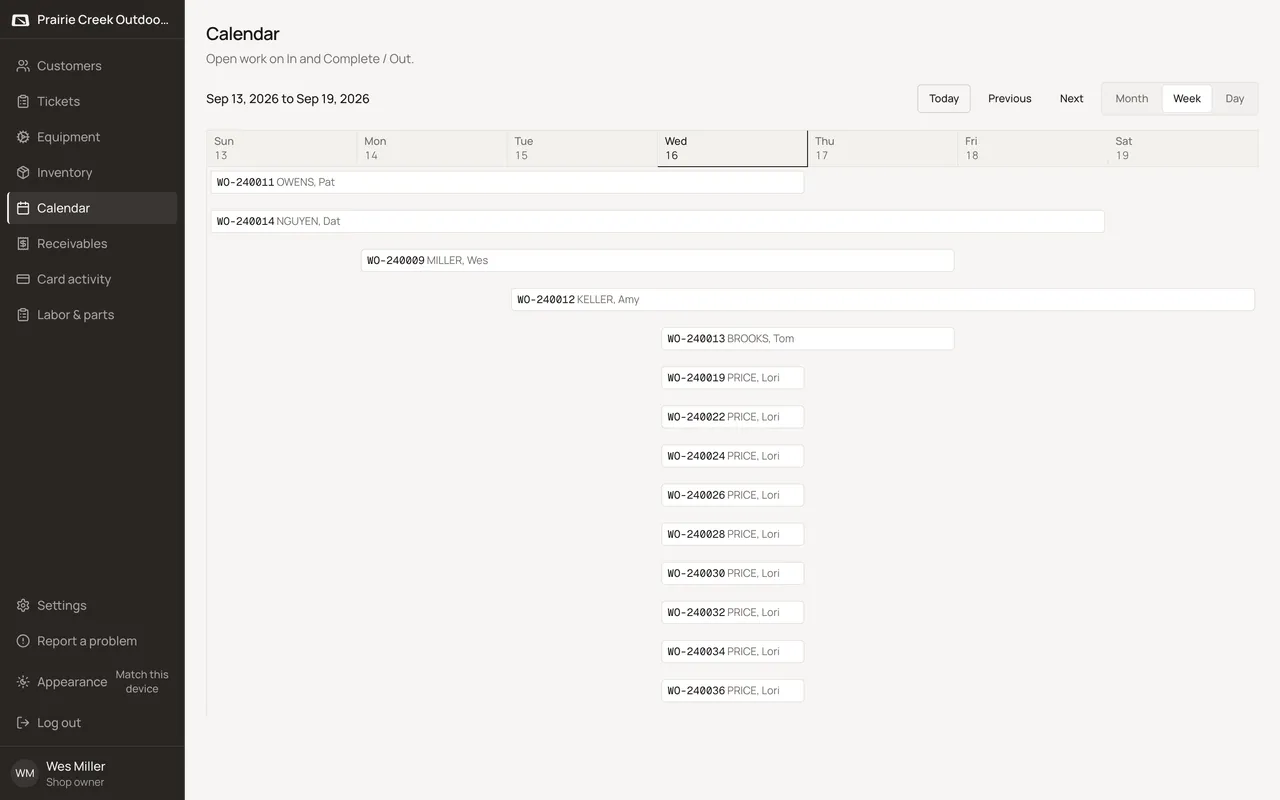
See the week's load on the calendar
Who this is for. Counter, shop owner.
Watch it
17 seconds, narrated, captions on. Sample shop. Made-up names and tickets.
What the clip says
Every open work ticket carries an In date and a Done / Out date. The calendar's Week view plots each ticket across that span. Brooks's ticket runs two days on the board, matching its own header.
The calendar plots open tickets only; an invoiced ticket drops off the board the moment it’s finished. Day view splits into In shop and Due out columns; Month and Week give the wider view.
Steps
- Choose Month, Week, or Day.
- Each open ticket plots from its In date through its Done / Out date once that field is set on the ticket header. Leave Done / Out blank and the ticket occupies just its In day.
- Month view shows up to three tickets a day. Anything past that folds behind a +N chip that opens Day view for that date.
- Click any block, chip, or +N to go straight to that day or ticket.
- Once a ticket is invoiced, it leaves the calendar entirely.
What happens to money and stock
Nothing moves.
Watch out for
- The calendar does not edit dates. It only plots open tickets on their In and Done / Out dates.
- Sales tickets never appear on the calendar, regardless of state.
- Voiding an invoiced ticket clears its Done / Out date back to blank, so a reopened ticket returns to a single day on In.
Updated September 16, 2026